Your app is a browser tab vs your app is a process
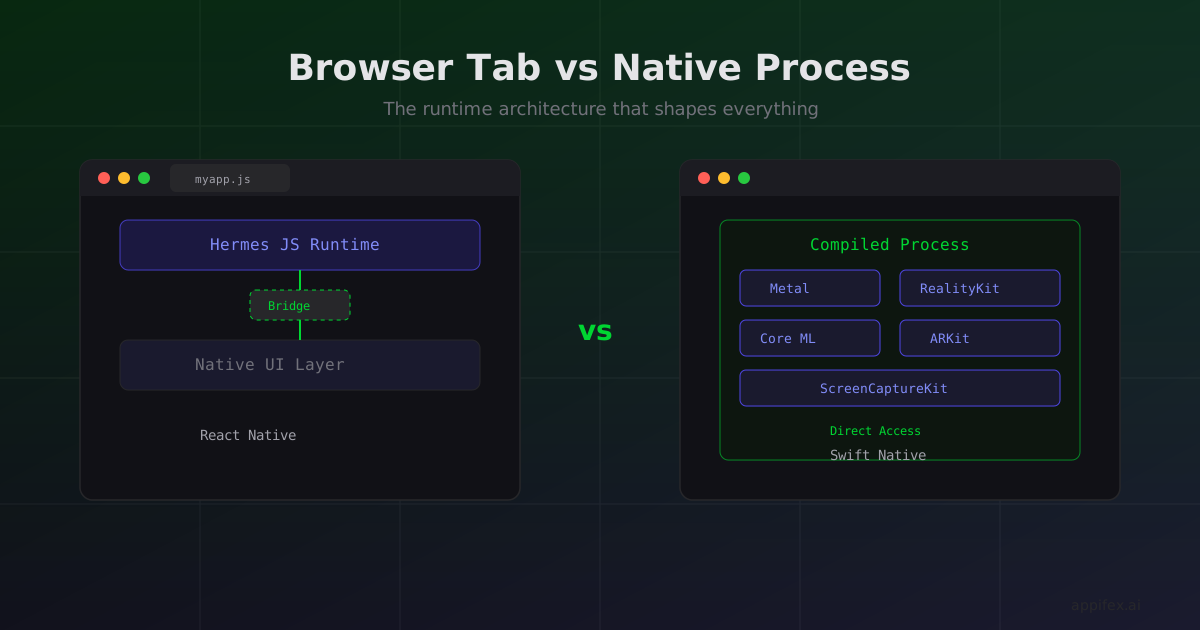
Most React Native vs Native comparisons start with benchmarks. Frame rates, startup time, memory consumption. Those numbers are real, but they obscure the actual architectural difference: React Native apps run inside a JavaScript runtime embedded in your app. Swift apps compile down to processes that talk directly to Apple's frameworks.
That distinction sounds academic until you need something that lives outside the JS runtime's reach.
What "runs in a runtime" actually means
A React Native app ships a JavaScript bundle that executes inside Hermes (or JSC). Your UI code describes what you want — "render a scrollable list with these items" — and the bridge translates that into native UIKit or SwiftUI calls. For most apps, this works fine. The list scrolls, the buttons tap, the animations play.
But the bridge is a bottleneck with a specific shape. It serializes data between JS and native, and it processes that data asynchronously. For a CRUD app or a social feed, you never notice. For anything that needs to touch the GPU directly, capture screen frames, or run a tight physics loop, you feel it immediately.
// Swift: direct Metal shader compilation
let library = device.makeDefaultLibrary()!
let pipelineDescriptor = MTLRenderPipelineDescriptor()
pipelineDescriptor.vertexFunction = library.makeFunction(name: "vertexShader")
pipelineDescriptor.fragmentFunction = library.makeFunction(name: "fragmentShader")
let pipelineState = try device.makeRenderPipelineState(descriptor: pipelineDescriptor)
This Metal code compiles a shader pipeline that runs directly on the GPU. There's no bridge, no serialization, no async hop. The GPU gets your vertex and fragment functions as compiled machine code. In React Native, you'd need to drop into a native module to do this, at which point you're writing Swift anyway.
Where the runtime boundary bites
We've seen three categories where the runtime gap matters in practice:
Graphics-intensive apps. Games built with SpriteKit or SceneKit manage their own render loops. A SpriteKit scene updates physics, collision detection, and rendering at 60 or 120 FPS in a tight C/Swift loop. Routing every frame update through a JS bridge adds latency that compounds — a 2ms per-frame overhead at 120 FPS eats 24% of your frame budget.
System-level integrations. ScreenCaptureKit, for example, captures screen content as a CMSampleBuffer stream. ARKit delivers camera frames with depth data and world tracking matrices. These APIs hand you raw buffers that are designed to be consumed in the same process, often on specific dispatch queues. Wrapping them in a bridge serialization layer isn't just slow — it changes the programming model from synchronous buffer access to async message passing.
Hardware-accelerated ML. Core ML models run on the Neural Engine or GPU. The inference happens in-process, and results come back as native types (MLMultiArray, CVPixelBuffer). A React Native wrapper would need to serialize these results to JSON, cross the bridge, and deserialize in JS. For a single classification, fine. For real-time pose detection at 30 FPS, the serialization cost dominates.
When the runtime is actually an advantage
The flip side: running inside a managed runtime gives you capabilities that compiled code doesn't have.
React Native apps can receive OTA code updates without going through the App Store. Your JS bundle is just data that the runtime interprets, so you can swap it out at any time. A Swift binary is a compiled executable — changing it requires rebuilding, re-signing, and resubmitting.
The runtime also gives you a single execution model across platforms. The same JS code runs on iOS and Android because the runtime abstracts the platform away. A Swift app is an iOS app. Full stop.
The practical test
When evaluating which path to take, we've found one question cuts through the noise better than any benchmark: does your core feature need direct access to an Apple framework that doesn't have a maintained React Native wrapper?
If you're building a fitness tracker that overlays workout metrics on a camera feed using ARKit and HealthKit — native. If you're building a marketplace where the core feature is listing, searching, and buying — React Native. The runtime boundary isn't a quality gradient. It's a capability boundary.
The frameworks that live on the other side of that boundary (Metal, ARKit, RealityKit, ScreenCaptureKit, Core ML with Neural Engine) are Apple's most actively developed APIs. They advance every WWDC. React Native wrappers, when they exist, lag by months or years. When they don't exist, you're writing the native module yourself.
That's the real question: not "how smooth is it," but "can I reach the API I need?"
Building on either side of the boundary with Appifex
On Appifex, you don't have to commit to one side of the runtime boundary before you start building. The platform generates and deploys both React Native and Swift Native apps from the same interface. If your app lives comfortably inside the JS runtime — data display, forms, API calls — Appifex generates a full Expo/TypeScript project with instant OTA previews. If your core feature needs direct Metal, ARKit, or RealityKit access, Appifex generates Swift/SwiftUI code, builds it on a Mac runner, and streams the simulator to your browser.
The runtime boundary is real and it matters. But the toolchain overhead that used to make "pick the wrong framework" expensive? That's the part Appifex eliminates.
This post is part of our React Native vs Swift Native series. Next: A decision framework that actually helps.