React Native or Swift Native? Build both on Appifex
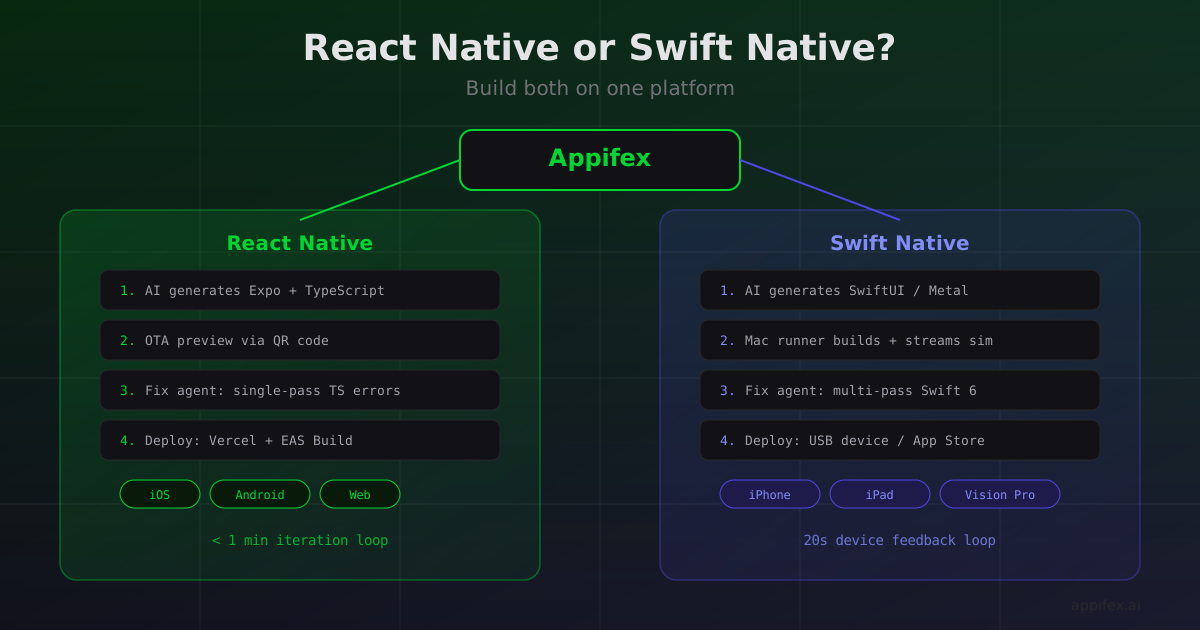
Choosing between React Native and Swift Native is one of the first decisions you make when building a mobile app. It's also one of the hardest to reverse. Pick the wrong side and you're looking at months of rework — not because the framework itself was wrong, but because the toolchains, build systems, and deployment pipelines are completely different.
We've written extensively about where each framework shines: the runtime architecture trade-offs, OTA updates, cross-platform code sharing, device testing workflows, visionOS, how errors surface differently, and a decision framework to help you choose. But here's what keeps coming up: most of the friction isn't the framework choice itself. It's everything around it.
Setting up Xcode signing. Configuring EAS Build. Managing provisioning profiles. Wiring up deployment pipelines. Debugging build failures across two completely different toolchains. That's where weeks disappear.
Appifex handles both paths from a single platform. Here's what that actually looks like.
One platform, two frameworks
When you create a project on Appifex, you choose your platform type. Pick React Native and you get a full Expo project with TypeScript, file-based routing, and optional backend generation. Pick Apple Native and you get a Swift/SwiftUI project with Xcode build support, SpriteKit or Metal templates for games, and direct device deployment.
The AI code generation, preview system, error correction, and deployment pipeline all adapt to whichever framework you chose. You don't need to learn two different toolchains. You describe what you want, and Appifex generates, builds, tests, and deploys it — whether that's a cross-platform React Native app or a native Swift app that talks directly to Metal and RealityKit.
React Native on Appifex: from prompt to OTA preview in under a minute
React Native's biggest structural advantage is OTA updates — the ability to push code changes to users without an App Store submission. Appifex leans into this for the entire development loop.
When you generate or update a React Native project, here's what happens:
- AI generates the code — TypeScript components, navigation, API integration, styled with your design system
- Preview launches instantly — the code deploys to a cloud sandbox running Vite (for web) or publishes an OTA update (for mobile). You scan a QR code with the Appifex companion app, and the latest version loads on your phone
- Automated QA runs — TypeScript type checking catches errors. The fix agent resolves most in a single pass because TypeScript errors are structured and deterministic
- Iterate in real time — describe changes in natural language, the code updates, OTA pushes the new bundle. No rebuild, no resubmit
Five learning cycles in a day instead of one. For products still searching for product-market fit, that velocity compounds fast.
And because React Native gives you iOS, Android, and web from one codebase, a single Appifex project can target all three platforms. The AI generates platform-aware code — handling Platform.select for UX differences, configuring native modules for each platform, and managing the divergence points that come with real cross-platform development.
Swift Native on Appifex: Xcode builds without the Xcode setup
Native Swift development has traditionally meant a local-only workflow: Xcode on your Mac, manual certificate management, simulator-only testing unless you wrangle provisioning profiles. Appifex changes that.
When you generate a Swift Native project:
- AI generates Swift/SwiftUI code — including SpriteKit scenes, Metal shaders, or RealityKit entities depending on your project type
- Your Mac runner builds it — Appifex connects to a Mac (yours or a cloud runner) that runs
xcodebuild. The build output streams back to your browser in real time - Simulator preview streams to your browser — the app launches in an iOS or visionOS simulator, and you see and interact with it directly in the Appifex interface
- Device deployment is one click — Appifex auto-registers your device UDID via the App Store Connect API, generates provisioning profiles, and installs directly over USB. The 20-second feedback loop, fully automated
The fix agent works differently for Swift. Swift 6 concurrency errors, Metal shader mismatches, and SpriteKit coordinate bugs require multi-pass fixes. Appifex's QA pipeline handles this automatically — running xcodebuild, analyzing errors, applying fixes, and rebuilding until the project compiles. It typically takes 2-3 cycles instead of one, but you don't have to babysit any of them.
Choosing a framework with Appifex in the picture
We put together a decision framework with five questions to help you pick. Here's how those questions land when you're building on Appifex:
| Decision factor | React Native on Appifex | Swift Native on Appifex |
|---|---|---|
| Needs native-only frameworks (Metal, RealityKit, visionOS) | Not available — use Swift | Full support with simulator streaming |
| Needs Android | Single codebase, both platforms | iOS only |
| Fast iteration post-launch | OTA updates deploy in seconds | App Store submission required |
| Team expertise | AI generates TypeScript — team skill matters less | AI generates Swift — team skill matters less |
| Performance-critical (GPU, AR, ML) | Bridge overhead on compute-heavy tasks | Direct framework access, no bridge |
The AI generation layer changes the "team expertise" factor significantly. You don't need to be a Swift expert to build a native Swift app on Appifex, and you don't need React Native experience to ship a cross-platform app. The platform handles the framework-specific complexity — so the decision comes down to what your product needs, not what your team already knows.
What each path looks like end-to-end
React Native path
Describe your app
  → AI generates Expo + TypeScript project
  → Web preview loads in browser iframe (cloud sandbox)
  → Mobile preview via QR code (OTA to companion app)
  → Iterate with natural language ("add a settings page", "fix the checkout flow")
  → Fix agent auto-resolves TypeScript errors
  → Publish to Vercel (web) + EAS Build (mobile) when ready
Swift Native path
Describe your app
  → AI generates Swift/SwiftUI project (or SpriteKit/Metal/RealityKit)
  → Mac runner builds with xcodebuild
  → Simulator streams to browser (iPhone or Vision Pro)
  → Iterate with natural language ("make the sphere respond to tap", "add a particle effect")
  → Fix agent auto-resolves Swift build errors (multi-pass for concurrency issues)
  → Deploy to device over USB or submit to App Store
The hybrid option
Some projects need both. A React Native app for the core product (cross-platform reach, OTA iteration speed) with a native Swift module for a performance-critical feature (AR view, custom camera, real-time audio processing). Appifex supports this — generate the React Native project, then add native modules where the runtime boundary demands it.
Go deeper
Each of these posts digs into a specific dimension of the React Native vs Swift Native decision:
- Your app is a browser tab vs your app is a process — The fundamental runtime architecture difference and where the bridge boundary limits React Native
- A decision framework that actually helps — Five concrete questions that resolve the framework choice
- Physical device testing without TestFlight — How native Swift's direct device install creates a 20-second feedback loop
- One codebase, three platforms — Where React Native's cross-platform code sharing holds up (85-95%) and where it breaks down (50-65%)
- The OTA superpower — Why React Native's over-the-air updates are a structural advantage for early-stage products
- visionOS is native-only territory — Why spatial computing requires Swift and how Appifex handles visionOS simulator builds
- How different platforms break differently — Why TypeScript errors fix in one pass and Swift errors take three, and how the fix agent handles both
The framework debate isn't going away. But the manual setup, build configuration, and deployment friction that used to dominate the decision? That part is solved. Pick the framework that fits your product. Appifex handles the rest.