React Native or Swift? A decision framework that actually helps
Every "React Native vs Native" article eventually lands on the same non-answer: "it depends on your use case." True, but useless. You already know it depends. You need to know what specifically it depends on.
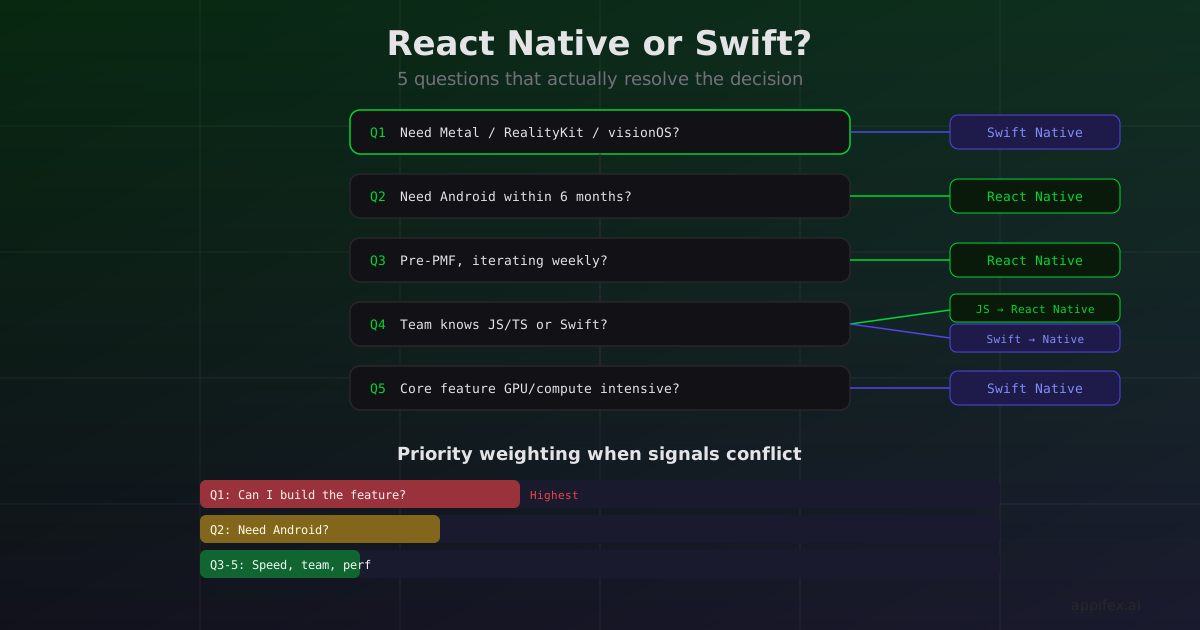
After building both flows on Appifex and watching hundreds of projects go through each path, we've converged on five questions that actually resolve the decision. Not a vibes check. Not a benchmark table. Five concrete questions about your app.
Question 1: Does your core feature need a framework that only exists in native Swift?
This is the hard filter. Some Apple frameworks have no React Native equivalent and no community bridge:
- RealityKit / visionOS: Spatial computing, 3D entity systems, immersive spaces
- Metal: Custom GPU shaders, compute pipelines, advanced rendering
- ScreenCaptureKit: System-level screen capture and streaming
- Core ML with Neural Engine: On-device ML inference at maximum hardware performance
- WeatherKit with full historical data: Detailed weather APIs
- App Intents + Shortcuts deep integration: System-level automation hooks
If your app's primary value comes from one of these, the decision is made. No amount of cross-platform code sharing compensates for "can't build the product."
If your core feature is data display, forms, messaging, e-commerce, social, or content management, neither platform has an architectural advantage. Move to question 2.
Question 2: Do you need Android?
Simple but often skipped. If your product needs to be on Android — whether day one or within six months of launch — React Native gives you both platforms from one codebase. Building the same app natively in Swift and Kotlin is roughly double the engineering effort and ongoing maintenance.
If you're iOS-only (and confident about that), this factor is neutral.
Need Android?
  ├─ Yes → Strong signal toward React Native
  └─ No / iOS-only → Move to question 3
Question 3: How fast do you need to iterate post-launch?
React Native apps can push code updates over the air without App Store review. New screens, bug fixes, UI changes — all deployed in minutes via EAS Update or CodePush.
Swift apps go through Xcode build → App Store Connect → review → user update. Minimum 24 hours for a fix, often longer.
If you're in an early stage hunting for product-market fit and expect to iterate on flows, pricing, and UX multiple times per week, OTA updates are a structural advantage. If your app is mature with predictable, less frequent release cycles, this matters less.
Question 4: What does your team know?
This one is practical, not aspirational. A team of three React/TypeScript developers will ship a React Native app 3-5x faster than their first Swift app. A team with iOS experience will be more productive in SwiftUI than learning React Native's idioms and debugging bridge issues.
"We'll learn Swift" is a fine long-term plan. It's a bad plan for a product that needs to ship in six weeks.
Team expertise:
  ├─ JavaScript/TypeScript → React Native (ship faster now)
  ├─ Swift/iOS → Native (play to your strengths)
  └─ Both → Pick based on questions 1-3
Question 5: What's the performance profile of your app?
Not "does performance matter" — it always matters. The real question is where the performance bottleneck lives.
CPU/GPU-bound apps (games, video processing, AR, image manipulation): Native Swift with direct framework access will outperform a bridge-mediated React Native app on computationally intensive tasks. The gap widens with complexity — a simple image filter might be negligible, but real-time video processing with Metal compute shaders can be 10x faster without bridge overhead.
Network/IO-bound apps (API calls, database reads, file uploads): No meaningful performance difference. Both platforms make the same HTTP calls and wait for the same network latency. The bridge overhead is invisible compared to a 200ms API round trip.
UI-bound apps (complex animations, gesture-heavy interfaces): React Native's new architecture (Fabric renderer, TurboModules) has closed much of the gap. Simple animations and gestures feel identical. Complex, multi-layered animations with spring physics and gesture interruption still feel more responsive in native SwiftUI, though the gap is narrower than it was two years ago.
Putting it together
Here's the decision tree in practice:
| Signal | Points toward |
|---|---|
| Needs Metal, RealityKit, visionOS, or ScreenCaptureKit | Swift Native |
| Needs Android within 6 months | React Native |
| Pre-product-market-fit, iterating weekly | React Native (OTA) |
| Team is JavaScript/TypeScript native | React Native |
| Team is Swift/iOS native | Swift Native |
| Core feature is GPU/compute intensive | Swift Native |
| Core feature is data display and forms | Either (go with team strength) |
If the signals all point the same direction, the decision is clear. If they conflict, weight them by risk: "can't build the core feature" (question 1) outweighs everything. "Need Android" (question 2) outweighs iteration speed (question 3). Team expertise (question 4) outweighs theoretical performance (question 5).
The hybrid option is real
Worth acknowledging: you don't have to pick one forever. React Native apps can embed native Swift modules for performance-critical views. Some teams build the core app in React Native for cross-platform reach and build specific features (AR view, custom camera, real-time audio) as native modules.
The cost is complexity — you're maintaining two build systems, two dependency graphs, and a bridge layer between them. For a team with both skillsets, it's a pragmatic middle ground. For a small team choosing their first framework, pick one and commit.
The goal isn't to find the "best" framework in the abstract. It's to find the one that gets your specific app to your specific users with the least friction. These five questions narrow it down from a philosophical debate to a concrete answer.
Try both paths on Appifex
One thing that changes this decision in practice: Appifex supports both React Native and Swift Native from the same platform. AI code generation, automated builds, preview, and deployment work for either framework. That means question 4 (team expertise) carries less weight — Appifex generates idiomatic TypeScript or Swift regardless of what your team knows. And the cost of the "wrong" choice drops because switching frameworks doesn't mean learning a new toolchain from scratch.
If you're still on the fence after these five questions, the fastest way to resolve it is to prototype in both. Describe your app on Appifex, generate it as React Native, see what the preview looks like. Then create a new project as Swift Native and compare. The framework that feels right for your core feature is the one to ship.
This post is part of our React Native vs Swift Native series. Read the full series for deep dives into runtime architecture, OTA updates, device testing, and more.