Physical device testing without TestFlight
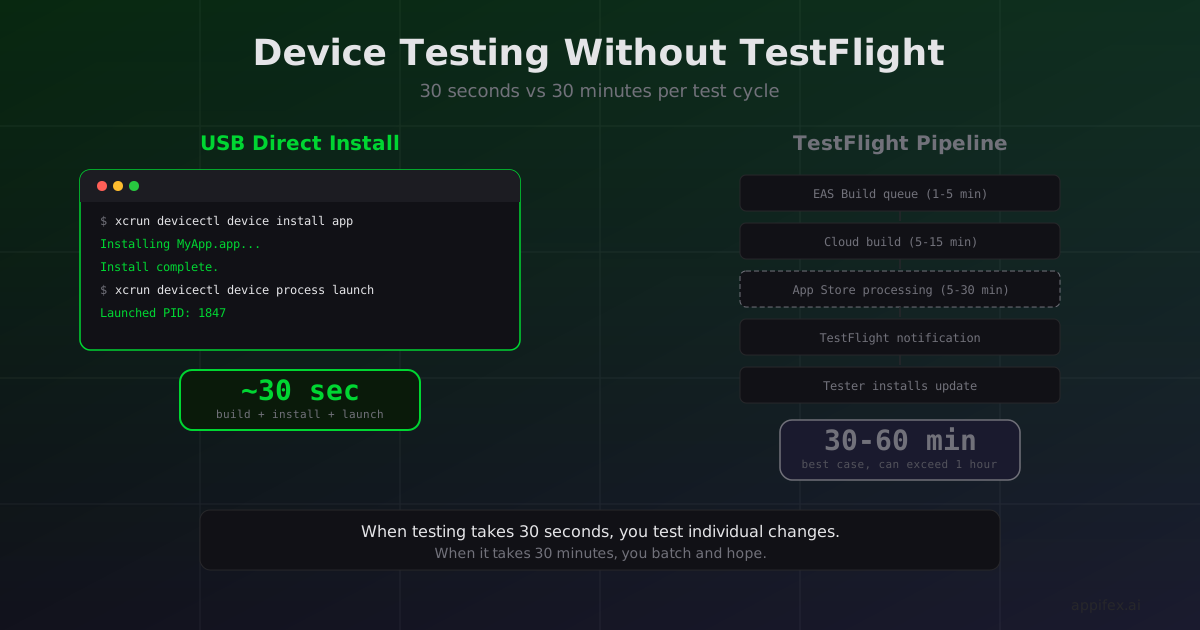
Plug in an iPhone. Run one command. The app is running on the device.
xcrun devicectl device install app --device 00008110-XXXX MyApp.app
xcrun devicectl device process launch --device 00008110-XXXX com.example.MyApp
That's the native Swift feedback loop for physical device testing. No TestFlight. No App Store Connect. No waiting for processing. The app goes from Xcode build output to running on hardware in seconds.
The TestFlight detour
React Native apps targeting physical devices typically go through a longer path. EAS Build compiles the binary in Expo's cloud infrastructure, uploads the .ipa to App Store Connect, and TestFlight distributes it to testers. The timeline looks like this:
- Push code and trigger EAS Build (1-5 minutes queue + 5-15 minutes build)
- App Store Connect processes the build (5-30 minutes)
- TestFlight distributes to testers (1-5 minutes)
- Tester receives notification, opens TestFlight, installs update
Best case: 15 minutes. Typical case: 30-45 minutes. Bad day: over an hour if the App Store Connect processing queue is backed up.
For daily development, most React Native developers don't go through this. They use Expo Go or a development build running on the device, with hot reload over the local network. That works well for UI iteration. But it doesn't test the release build configuration — optimized Hermes bytecode, production API endpoints, release-mode native module behavior. When you need to test what users will actually experience, you're back in the TestFlight queue.
Direct install changes how you test
With native Swift and a connected device, testing the release build is a natural part of the development loop:
# Build for device with release configuration
xcodebuild -scheme MyApp -configuration Release \
  -destination 'id=00008110-XXXX' \
  -allowProvisioningUpdates \
  -authenticationKeyPath ~/AuthKey.p8 \
  -authenticationKeyID ABC123 \
  -authenticationKeyIssuerID def-456-ghi

# Install and launch
xcrun devicectl device install app --device 00008110-XXXX \
  build/Release-iphoneos/MyApp.app
xcrun devicectl device process launch --device 00008110-XXXX \
  com.example.MyApp
The total time from "I changed a line of code" to "the release build is running on my phone" is the Xcode build time plus a few seconds for install. For a mid-sized project with incremental builds, that's typically 20-60 seconds.
This changes testing behavior in a way that's hard to appreciate until you've experienced both workflows. When device testing takes 30 minutes, you batch your tests. You accumulate changes, push them all at once, and test the batch. When it takes 30 seconds, you test individual changes. Found a layout issue on smaller screens? Fix it, build, check. Haptic feedback feels off? Adjust the intensity, build, check.
The granularity of testing improves because the cost of each test dropped by two orders of magnitude.
The provisioning gap is closing
The traditional objection to direct device install was provisioning complexity. You needed to register device UDIDs in the Apple Developer portal, generate provisioning profiles, manage certificates, and keep them all in sync. It was genuinely painful.
Apple's App Store Connect API and automatic provisioning have simplified this significantly. Xcode can handle device registration, provisioning profile generation, and code signing automatically when given an ASC API key:
# Xcode handles everything with these flags
-allowProvisioningUpdates
-allowProvisioningDeviceRegistration
-authenticationKeyPath path/to/key.p8
On Appifex, when a user connects a device and triggers a device build, the system registers the device UDID via the App Store Connect API, generates the appropriate provisioning profile, and passes signing credentials to the build. The user doesn't manually manage any certificates or profiles. The only prerequisite is an Apple Developer account and an API key.
Where each approach wins
Direct device install is best for:
- Rapid iteration on device-specific behavior (haptics, camera, sensors)
- Testing release build performance and behavior
- Debugging issues that only reproduce on physical hardware
- Small teams where everyone has a test device on their desk
TestFlight distribution is best for:
- Distributing to testers who aren't in the same room
- Beta testing with a larger group (up to 10,000 external testers)
- Testing the actual distribution pipeline before App Store submission
- QA teams that test on multiple device models simultaneously
These aren't competing approaches — they serve different stages. Direct install for development iteration, TestFlight for pre-release distribution. The mistake is using TestFlight for the development loop, which adds 30+ minutes of latency to every cycle.
The second-order effect
Fast device testing feeds back into code quality in a subtle way. When testing is cheap, developers test more edge cases. They check landscape orientation, dynamic type sizes, VoiceOver behavior — things that get skipped when every test cycle costs half an hour. The accessibility and polish of an app correlates more with how fast the developer can test than with how skilled they are at predicting edge cases.
The shortest path from code change to running on a real device isn't a nice-to-have for developer experience. It shapes what gets tested, which shapes what gets shipped.
How Appifex automates the entire device testing loop
On Appifex, the provisioning and device install workflow is fully automated for Swift Native projects. When you connect a device and trigger a build:
- Appifex registers your device UDID via the App Store Connect API
- Generates the appropriate provisioning profile
- Builds with
xcodebuildon your Mac runner with release configuration - Installs directly to the device
You get the 20-second feedback loop described above without manually managing certificates, profiles, or xcrun commands. For React Native projects, Appifex takes the opposite approach — OTA preview via the companion app means you never need a device build during development at all. Each framework gets the testing workflow that plays to its strengths.
This post is part of our React Native vs Swift Native series. See also: The OTA superpower React Native has for the other side of the testing speed coin.