One codebase, three platforms (and when that's actually true)
"Write once, run anywhere" has been a pitch since Java applets. React Native's version of it — one JavaScript codebase for iOS, Android, and web — is closer to reality than most attempts. But "closer" isn't "there." The asterisks matter.
We've shipped cross-platform React Native apps on Appifex that share 90%+ code across platforms. We've also seen projects where platform divergence crept up to 40%. The difference isn't the framework — it's what the app actually does.
The 90% that shares cleanly
Business logic shares perfectly. API calls, state management, validation, data transformation — none of this cares what platform it runs on. A function that calculates shipping costs works identically on iOS, Android, and web.
// This code is 100% shared across all platforms
export function calculateShipping(items: CartItem[], address: Address): number {
  const weight = items.reduce((sum, item) => sum + item.weight * item.quantity, 0);
  const zone = getShippingZone(address.zipCode);
  return RATE_TABLE[zone] * Math.ceil(weight / 16); // per pound
}
Navigation structure shares well too. Expo Router uses file-system routing that maps to native navigation on mobile and browser routing on web. Define your screens once, and the router handles the platform-appropriate navigation pattern (stack on mobile, URL-based on web).
UI components share at a high level. A <TextInput>, a <FlatList>, a <TouchableOpacity> — these render to native platform equivalents. The text input becomes a UITextField on iOS, an EditText on Android, and an <input> on web. For standard form-based UIs, you write one component tree and it works.
Where the codebase forks
Platform-specific UX patterns. iOS users expect swipe-to-go-back. Android users expect a hardware back button and bottom navigation. Web users expect right-click context menus and hover states. These aren't bugs — they're platform conventions that users notice when violated.
// Platform-specific behavior creeping in
import { Platform } from 'react-native';

const TabBar = () => (
  <Tabs screenOptions={{
    tabBarPosition: Platform.OS === 'android' ? 'bottom' : 'bottom',
    // iOS: tab bar items have labels below icons
    // Android: Material Design uses different spacing
    // Web: you might want a sidebar instead of tabs entirely
    tabBarStyle: Platform.select({
      ios: { paddingBottom: 8 },
      android: { elevation: 8 },
      web: { display: 'none' }, // using sidebar nav on web
    }),
  }} />
);
That Platform.select starts small — a padding value here, a shadow there. But it accumulates. By the time you've handled platform-specific navigation, gesture behavior, keyboard handling, and status bar management, your "shared" components contain significant conditional logic.
Native module dependencies. Any feature that touches device hardware requires a native module: camera, biometrics, NFC, Bluetooth, push notifications. Expo provides managed modules for common cases, but each one has platform-specific configuration. A push notification setup involves APNs certificates for iOS and FCM keys for Android. The JavaScript API is shared, but the infrastructure behind it isn't.
Web divergence. React Native Web maps native components to DOM elements, and it works better than you'd expect. But web apps have fundamentally different interaction models — mouse vs touch, multi-window vs single-window, responsive layouts vs fixed screen sizes. Apps that take web seriously end up with web-specific layouts, navigation, and interaction patterns that diverge significantly from mobile.
The honest code-sharing numbers
From projects we've seen built on Appifex:
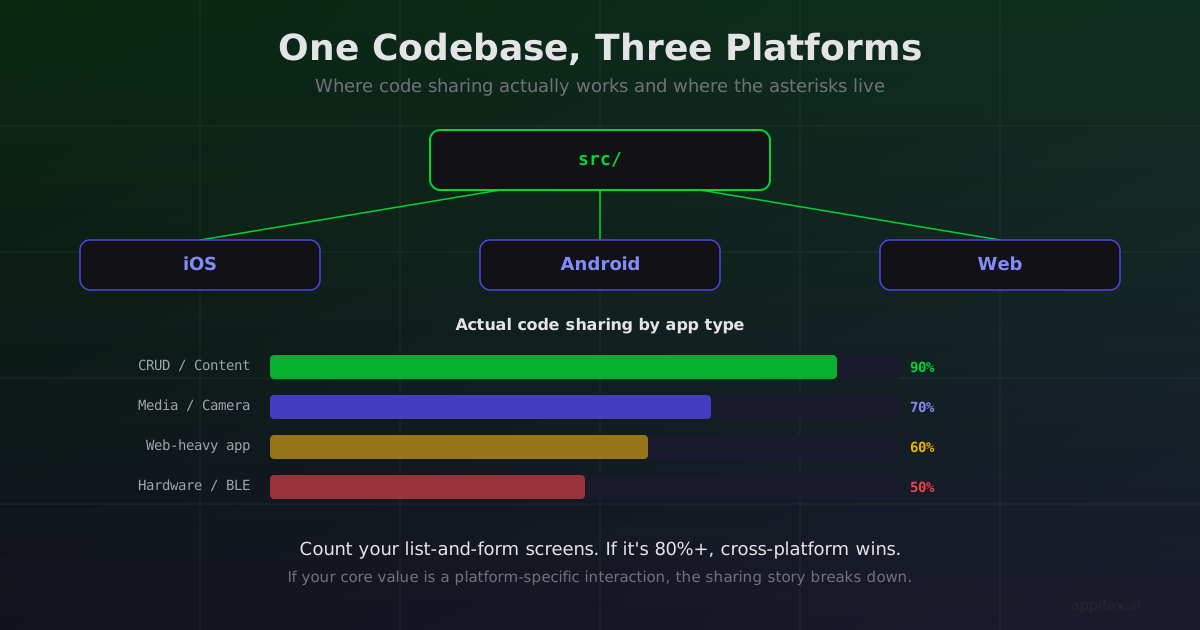
CRUD apps and content apps (social feeds, dashboards, e-commerce): 85-95% code sharing. The core is forms, lists, and API calls. Platform-specific code is mostly styling tweaks and navigation config.
Media-heavy apps (photo editing, video, audio): 60-75% code sharing. Playback and capture use platform-specific native modules. The UI around them shares, but the core feature doesn't.
Apps with significant web presence (landing pages, admin panels, user-facing web app): 70-80% between iOS and Android, but web drops to 50-65% because the layout and interaction model diverges.
Hardware-integrated apps (Bluetooth peripherals, NFC, AR): 50-70% code sharing. Each platform has different permission models, connection patterns, and capability detection.
When one codebase is the right bet
The cross-platform story is strongest when your app is data-driven rather than interaction-driven. If users are reading, filling out forms, browsing catalogs, and managing content, the platform-specific surface area is small. The business logic (which shares completely) dominates.
It weakens when your app's core value is a platform-specific interaction. A drawing app with Apple Pencil pressure sensitivity. A music app with Android's low-latency audio pipeline. A web app with drag-and-drop workflows. These interactions are native to one platform and bridged (with compromises) to others.
The honest answer to "should I go cross-platform?" is: count the screens in your app that are just lists, forms, and detail views. If it's 80%+, React Native will save you real time and the asterisks won't matter much. If your app lives in the remaining 20% — the camera view, the canvas, the Bluetooth connection screen — you'll spend as much time writing platform-specific code as you saved by going cross-platform.
One codebase is a spectrum, not a binary. Know where your app falls before you commit to the pitch.
How Appifex handles cross-platform divergence
The code-sharing numbers above come from real projects built on Appifex. When Appifex generates a React Native project, the AI produces platform-aware code from the start — handling Platform.select for UX differences, configuring native modules per platform, and structuring the project so shared business logic stays separate from platform-specific UI.
For projects that fall in the 50-70% code sharing range — where platform divergence is high — Appifex also supports a hybrid approach: a React Native core for cross-platform screens with native Swift modules for features that need direct framework access. The platform manages both build systems so you don't have to.
This post is part of our React Native vs Swift Native series. For the single-platform alternative, see visionOS is native-only territory and the runtime architecture post.