visionOS is native-only territory
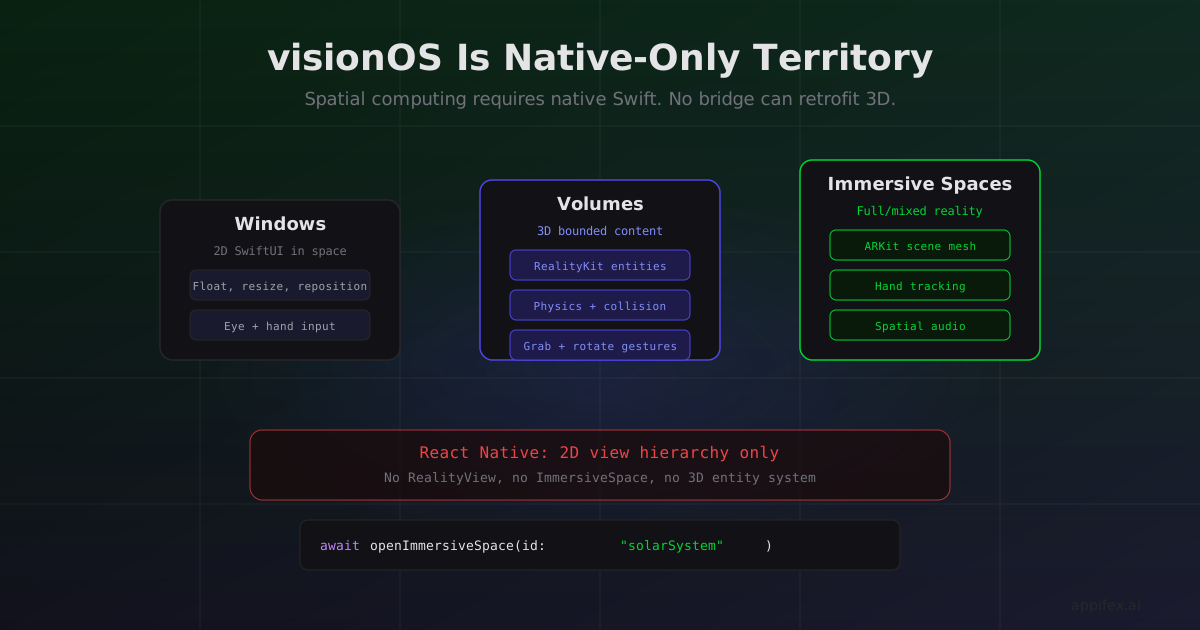
Apple Vision Pro shipped in February 2024. As of today, there is no React Native support for visionOS. No Expo plugin. No community bridge. No roadmap from Meta to add it.
If you're building for spatial computing, the platform decision is already made.
Why React Native can't just "add visionOS support"
React Native's architecture maps UI descriptions to native platform views. On iOS, a <View> becomes a UIView. On Android, it becomes an android.view.View. This mapping works because both platforms share a 2D screen-based UI model: rectangles laid out in a coordinate system with x, y, width, and height.
visionOS breaks that model. A window in visionOS exists in 3D space. It has depth, it responds to eye tracking, and it can coexist with volumetric content that floats outside any window boundary. The fundamental unit of spatial UI isn't a rectangle — it's a RealityView that hosts 3D entities in a coordinate system with six degrees of freedom.
struct ImmersiveView: View {
    var body: some View {
        RealityView { content in
            let sphere = ModelEntity(
                mesh: .generateSphere(radius: 0.1),
                materials: [SimpleMaterial(color: .blue, isMetallic: true)]
            )
            sphere.position = [0, 1.5, -1] // 1.5m up, 1m in front of user
            sphere.components.set(InputTargetComponent())
            sphere.components.set(CollisionComponent(
                shapes: [.generateSphere(radius: 0.1)]
            ))
            content.add(sphere)
        }
        .gesture(TapGesture().targetedToAnyEntity().onEnded { value in
            // User looked at the sphere and pinched
            value.entity.position.y += 0.1
        })
    }
}
This code places a metallic sphere 1 meter in front of the user, 1.5 meters off the ground, and moves it up when the user looks at it and pinches. Every concept here — 3D positioning, entity-component architecture, gaze-and-pinch input — has no equivalent in React Native's 2D view hierarchy.
A React Native bridge for visionOS wouldn't just need new native modules. It would need a fundamentally different rendering model, a new input system, and a way to describe 3D spatial relationships in JavaScript. That's not a plugin — it's a new framework.
The three layers of visionOS apps
visionOS apps operate in three distinct modes, and each pulls further away from what a cross-platform abstraction can express:
Windows. Standard 2D SwiftUI windows that float in space. These are the closest to traditional iOS UI, and theoretically, a React Native bridge could target them. But even windows behave differently — they have no fixed position on screen, the user moves them with hand gestures, and the system manages depth ordering based on gaze.
Volumes. 3D content bounded in a specific region of space. A chess game where pieces sit on a board in front of you. A molecular model you can rotate by grabbing it. Volumes use RealityKit entities with physics, collision, and spatial audio. There's no 2D analogue.
Immersive Spaces. Full or mixed reality experiences where your content shares (or replaces) the real world. An immersive space can place objects anywhere around the user, respond to room geometry via scene understanding, and anchor content to real-world surfaces. This is the deepest Apple framework integration — ARKit, RealityKit, Spatial Audio, and hand tracking all running together.
// Opening an immersive space
@Environment(\.openImmersiveSpace) var openImmersiveSpace

Button("Enter") {
    await openImmersiveSpace(id: "solarSystem")
}
The immersive space API is a SwiftUI environment action. It's not a view you render — it's a system-level mode transition that changes how the entire app relates to physical space. There's nothing to bridge to.
What this means for your roadmap
If spatial computing is a "nice to have in 2027," you can build in React Native today and cross that bridge later. Your iOS and Android app ships faster, and you add a native visionOS target when the user base justifies it.
But if spatial computing is your product — if you're building a 3D visualization tool, an architectural walkthrough, a spatial training app, a mixed reality game — starting in React Native means building something you'll throw away. The core interactions (spatial layout, hand tracking, gaze input, immersive spaces) don't translate from a 2D codebase.
We run visionOS simulator builds the same way we run iPhone simulator builds on Appifex. The user's Mac runner detects available Vision Pro simulators and reports them as build targets. The Xcode build runs with -destination 'platform=visionOS Simulator', and the resulting app launches in the visionOS simulator. The same streaming infrastructure that shows your iPhone app in the browser works for visionOS — you see the simulator window, interact with it via mouse (mapped to gaze + pinch), and iterate on spatial UI without a headset.
The visionOS installed base is small today. But Apple is investing aggressively — new hardware, developer tools, and framework capabilities every WWDC. If your bet is that spatial computing matters in 3-5 years, the foundation you build today needs to be native Swift. There's no bridge that can retrofit 3D spatial reasoning onto a 2D abstraction layer.
That's not a knock on React Native. It's a recognition that some platforms require native access not as a performance optimization, but as a prerequisite for the core interaction model.
Building visionOS apps on Appifex
Appifex supports visionOS as a first-class build target for Swift Native projects. The workflow mirrors iPhone development: the AI generates Swift/SwiftUI code with RealityKit entities, your Mac runner builds with -destination 'platform=visionOS Simulator', and the visionOS simulator streams to your browser. You interact via mouse (mapped to gaze + pinch) and iterate on spatial UI without needing a Vision Pro headset.
This matters because visionOS development has an even higher toolchain barrier than standard iOS. You need Xcode with visionOS SDK, a Mac with enough resources to run the simulator, and familiarity with RealityKit's entity-component system. Appifex handles the build infrastructure and generates idiomatic spatial code — RealityView, InputTargetComponent, CollisionComponent, immersive space transitions — so you can focus on the spatial experience rather than the Xcode configuration.
This post is part of our React Native vs Swift Native series. For the architectural reason visionOS requires native Swift, see your app is a browser tab vs your app is a process.