The OTA superpower React Native has and native Swift doesn't
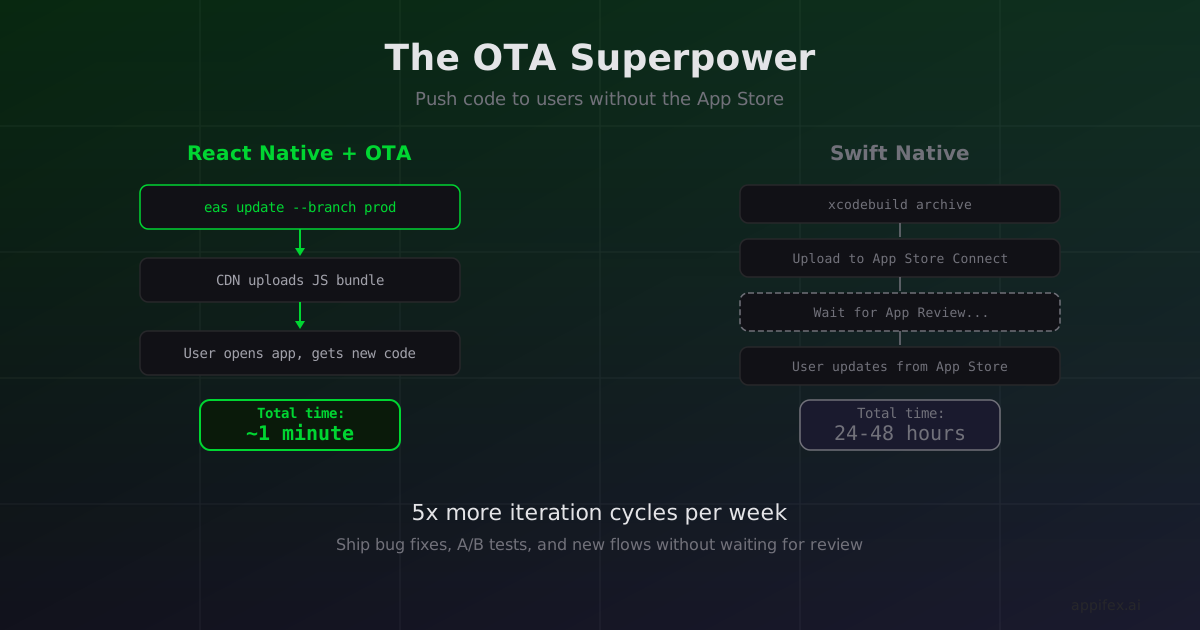
We pushed a bug fix to a React Native app at 2pm on a Tuesday. By 2:01pm, every user who opened the app had the fix. No App Store submission. No review queue. No waiting.
Try that with a Swift app.
How OTA updates actually work
React Native apps ship a JavaScript bundle — a blob of text that the Hermes runtime interprets at launch. Because it's data rather than compiled machine code, you can replace it without rebuilding the app binary.
EAS Update (Expo's update service) makes this a single command:
eas update --branch production --message "Fix checkout total calculation"
This uploads the new JS bundle to Expo's CDN. Next time a user opens the app, the Expo Updates client checks for a new bundle, downloads it in the background, and applies it on the next launch. The app binary on the user's phone never changes — only the code it runs.
A Swift app doesn't have this option. Your code compiles to machine instructions baked into the binary. Changing a single line means rebuilding the .ipa, uploading to App Store Connect, waiting for review (typically 24-48 hours), and hoping users update. Apple's review process is a hard gate that applies equally to critical bug fixes and minor copy changes.
Where this changes the game
Iteration during development. When we build preview flows on Appifex, React Native previews work by publishing an OTA update to a staging branch. The user scans a QR code, opens the companion app, and the latest code loads instantly. No build step. The feedback loop is: change code → run eas update → open app → see changes. Total time: under a minute.
For native Swift, preview requires compiling the project with Xcode, booting a simulator, installing the app, and launching it. Even with incremental builds, you're looking at 30 seconds to several minutes depending on project size. The wall clock difference compounds fast when you're iterating 20 times in an afternoon.
Post-launch bug fixes. The App Store review queue is unpredictable. Apple says "most submissions are reviewed within 24 hours," but if your fix lands on a Friday afternoon before a holiday weekend, you could be waiting days. OTA updates bypass this entirely. The fix ships when you push it.
A/B testing and feature flags. Since the JS bundle is swappable, you can maintain multiple bundle versions on different EAS Update branches and route users to them dynamically. This isn't a hack or a workaround — it's the intended usage pattern. Native apps achieve similar results with feature flag services, but those only toggle behavior switches. OTA updates can ship entirely new screens, components, and flows.
The constraints are real
OTA updates have hard limits. Apple's App Store guidelines (section 3.3.2) allow interpreted code updates only if they don't change the app's primary purpose or create a storefront. You can fix bugs, update UI, and add features within the app's existing scope. You can't use OTA updates to turn a weather app into a casino.
There's also a size constraint. OTA bundles that exceed a few megabytes make the download noticeable to users. Large asset changes (new images, videos, model files) should still go through a binary update.
And native modules can't be updated via OTA. If your fix requires changing Objective-C or Swift code in a native module, you need a full binary rebuild. The OTA path only covers the JS layer.
The math for MVPs
For early-stage products, the iteration speed advantage isn't marginal — it's structural. Consider two teams building the same MVP:
Team A (React Native + OTA): ships v1, gets user feedback on Monday, pushes three fixes by Wednesday, runs an A/B test on the onboarding flow by Friday. Five iterations in one week, zero App Store submissions.
Team B (Swift Native): ships v1, gets user feedback on Monday, submits a fix Tuesday, approved Wednesday, users update by Thursday. One iteration in one week.
Both teams have the same engineers, the same feature set, the same users. Team A gets 5x more learning cycles because the deployment bottleneck is a CDN upload instead of a review queue.
This doesn't mean React Native is always the right choice. If your app needs Metal shaders or ARKit, no amount of iteration speed compensates for "can't build the core feature." But if your app's value is in the product logic — the flows, the UX, the business rules — OTA updates let you learn faster than any native deployment pipeline can.
The best app isn't the one with the smoothest animations. It's the one that found product-market fit before the money ran out. OTA updates buy you time to find it.
OTA is built into the Appifex development loop
On Appifex, OTA isn't just a deployment feature — it's the preview system for React Native projects. Every time you generate or update code, Appifex publishes an OTA update to a staging branch. You scan the QR code with the Appifex companion app, and the latest version loads on your phone in seconds. No build queue. No simulator. Real code on a real device.
This means the iteration cycle described above (5x learning cycles vs 1x) isn't hypothetical — it's the default workflow. Describe a change in natural language, the AI updates the code, OTA pushes it, you see the result on your phone. The entire loop takes under a minute.
For Swift Native projects, Appifex uses simulator streaming and direct device install instead — different mechanism, same goal of keeping the feedback loop tight. See our device testing post for how that works.
This post is part of our React Native vs Swift Native series. For the flip side of iteration speed, see physical device testing without TestFlight.