When the fix agent matters: how different platforms break differently
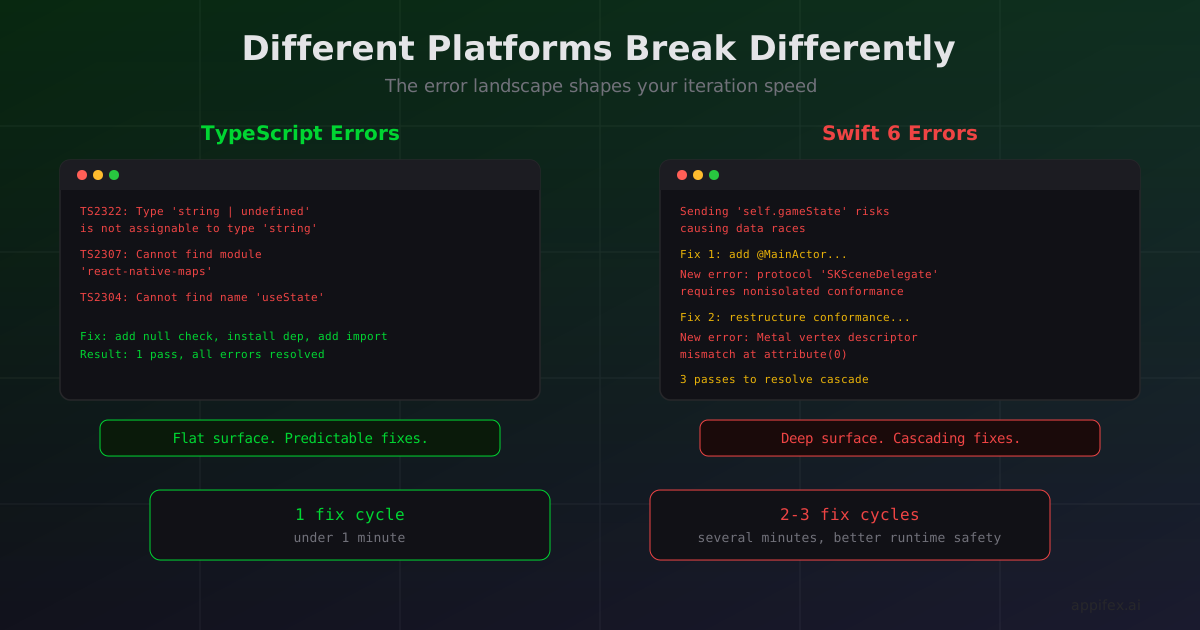
A TypeScript type error tells you exactly what's wrong: "Type 'string' is not assignable to type 'number'" with a file path and line number. You read it, you fix it, you move on.
A Swift 6 concurrency error tells you: "Sending 'self.gameState' risks causing data races." Good luck figuring out which thread is the problem, which actor boundary you crossed, and whether the fix is @MainActor, Sendable, or restructuring your entire data flow.
Different platforms produce fundamentally different categories of errors. When AI is writing the fix — whether it's an automated agent or a copilot suggestion — the error landscape determines whether the fix takes one attempt or five.
The TypeScript error surface
React Native apps built with TypeScript have a relatively flat error surface. Most build failures fall into a few well-defined categories:
// Category 1: Type mismatches
// "Type 'string | undefined' is not assignable to type 'string'"
// Fix: add a null check or use optional chaining

// Category 2: Missing imports
// "Cannot find name 'useState'"
// Fix: add import { useState } from 'react'

// Category 3: Missing dependencies
// "Cannot find module 'react-native-maps'"
// Fix: npx expo install react-native-maps

// Category 4: Runtime errors (only caught in preview)
// "Cannot read property 'map' of undefined"
// Fix: add a guard or default value
These errors are structured, specific, and self-contained. The error message contains enough information to generate a fix without understanding the broader architecture. An automated fix agent can resolve most TypeScript build errors in a single pass because the error-to-fix mapping is nearly deterministic.
The Swift error surface
Swift errors are a different animal. The compiler is stricter, the type system is more expressive, and Swift 6's concurrency checking adds a layer of analysis that has no TypeScript equivalent.
Concurrency errors are the most common stumbling block. Swift 6 enforces complete data isolation between concurrency domains. When the compiler says "Sending 'self.gameState' risks causing data races," it's telling you that a mutable value is crossing an actor boundary. The fix depends on your architecture:
// The error
class GameScene: SKScene {
    var score: Int = 0 // mutable state

    func updateUI() {
        // Error: sending 'self.score' from nonisolated to @MainActor
        Task { @MainActor in
            scoreLabel.text = "\(self.score)" // crosses actor boundary
        }
    }
}

// Fix option 1: Mark the whole class as @MainActor
@MainActor
class GameScene: SKScene { ... }

// Fix option 2: Make the value Sendable
// (not possible for complex mutable state)

// Fix option 3: Capture the value before crossing
func updateUI() {
    let currentScore = self.score
    Task { @MainActor in
        scoreLabel.text = "\(currentScore)"
    }
}
The right fix depends on whether GameScene should be main-actor-isolated (it probably should, since it touches UI), whether other parts of the code access it from background threads, and whether the class conforms to protocols that have their own actor requirements (like SKSceneDelegate). A fix agent needs to understand the class's role in the architecture, not just the error message.
Metal shader compilation errors are even more opaque. A mismatched vertex descriptor between Swift code and a .metal file produces errors like "Vertex attribute position(0) is missing from the vertex descriptor" — which tells you what's wrong but requires reading both the Swift pipeline setup and the Metal shader source to fix.
SpriteKit coordinate system bugs don't produce errors at all. The code compiles, the app runs, but the sprite appears at (0, 0) instead of the screen center because SpriteKit's origin is bottom-left while UIKit's is top-left. An automated fix agent needs to know that position = CGPoint(x: frame.midX, y: frame.midY) is the fix even though there's no compiler error.
Why this shapes iteration speed
On Appifex, we run automated QA after every code generation. For React Native projects, QA runs TypeScript type checking in a cloud sandbox. For Apple native projects, QA runs a full xcodebuild on the user's Mac.
The QA → fix → rebuild cycle typically looks like:
React Native: TypeScript finds 2 type errors → fix agent patches both in one pass → rebuild succeeds. One cycle, under a minute.
Swift Native: Xcode finds a concurrency error → fix agent adds @MainActor → rebuild reveals a new error because a protocol conformance now conflicts → fix agent restructures the conformance → rebuild succeeds. Two or three cycles, several minutes.
The deeper type system catches more bugs at compile time (which is good — better a compiler error than a runtime crash). But it also means the fix loop is longer and less predictable. Each fix can reveal errors in adjacent code that were previously hidden.
The practical takeaway
If you're building an app where the core logic is straightforward — forms, lists, API calls — React Native's shallower error surface means faster iteration and more predictable fix cycles. AI-assisted development works well here because most errors have one obvious fix.
If you're building something that pushes the platform — games, graphics, AR, complex animations — Swift's error surface is deeper but the compiler catches categories of bugs (data races, type mismatches in shader pipelines) that would be silent runtime failures in JavaScript. The trade-off is a longer fix loop for better runtime safety.
Neither error surface is "better." They reflect different design philosophies: TypeScript optimizes for developer velocity, Swift optimizes for runtime correctness. Your choice depends on which failure mode scares you more — slow iteration or production crashes.
How the Appifex fix agent handles both error surfaces
On Appifex, the fix agent is tuned for each platform's error characteristics. For React Native projects, it runs TypeScript type checking in a cloud sandbox and resolves most errors in a single pass — the structured, deterministic nature of TypeScript errors makes this reliable.
For Swift Native projects, the fix agent runs xcodebuild on your Mac runner and handles the multi-pass cycle automatically. It understands that fixing a Swift 6 concurrency error might reveal a protocol conformance conflict, so it rebuilds after each fix and continues until the project compiles. Up to 3 retry attempts, each one informed by the full compiler output.
The result: you describe what you want, and the platform handles the error surface — whether that's a flat TypeScript surface with one-pass fixes or a deep Swift surface that requires architectural reasoning across multiple cycles.
This post is part of our React Native vs Swift Native series. For the architectural foundation behind these different error surfaces, see your app is a browser tab vs your app is a process.