
3 posts tagged with "ios-development"

View All Tags

Apple Provisioning Profiles Explained (Step by Step)

· 14 min read

Appifex Team
Building the future of app development

You have an idea for an iPhone app. Maybe you've even built one. Now you want to put it on the App Store so real people can download it.

What follows is the most confusing process in all of software development. Apple requires you to deal with certificates, provisioning profiles, bundle identifiers, code signing, App Store Connect, TestFlight, and App Review. None of these terms mean what you'd expect. Experienced developers struggle with this. If you're not a developer, it's basically impenetrable.

This post covers the entire flow in plain language, no assumed knowledge. Nine steps between "I have an app" and "it's on the App Store."
Set up your Mac once. Build and test your app from anywhere.

· 5 min read
Appifex Team
Building the future of app development

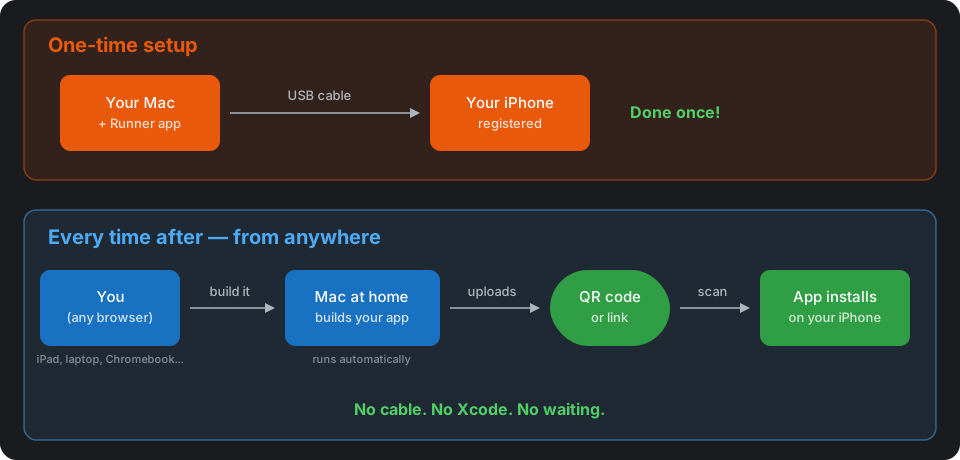
Building an iPhone app usually means sitting in front of a Mac with Xcode open and a cable plugged in. With Appifex, you do that setup once. After that, you can build new versions of your app and install them on your phone from any computer with a browser — no cable, no Mac nearby, no waiting.

Diagram: one-time USB setup, then build from any browser and install via QR code

Physical device testing without TestFlight

· 5 min read
Appifex Team
Building the future of app development

Plug in an iPhone. Run one command. The app is running on the device.

xcrun devicectl device install app --device 00008110-XXXX MyApp.app
xcrun devicectl device process launch --device 00008110-XXXX com.example.MyApp

That's the native Swift feedback loop for physical device testing. No TestFlight. No App Store Connect. No waiting for processing. The app goes from Xcode build output to running on hardware in seconds.