Preview and deploy
Appifex separates preview (temporary, for development) from publishing (permanent, to your own cloud). Build and test with instant previews, then publish when ready.
Preview
Previews run in temporary cloud sandboxes. They start automatically during code generation and update with every change.
Web
A live preview appears in the right panel as your code generates.
- Desktop and mobile views — Toggle between laptop and phone frame sizes
- Visual edit mode — Click any element in the preview, then describe what to change
- Previews auto-pause after 20 minutes of inactivity — click Resume preview to restart
Mobile
After generating mobile code, open the preview with one of these options:
- iOS: Download the Appifex app and scan the QR code
- Android: Open the preview URL in your phone browser from the QR code page
- Desktop/browser: Open the same preview URL directly in your browser
You can share the QR code page with anyone — no login required.
Backend
Backend APIs get an interactive documentation page where you can test endpoints directly in your browser.
Logs and database
During development, your session workspace includes:
- Logs tab — Real-time app logs with level filtering (Info, Warn, Error)
- Database tab — Browse your app's tables and data right in Appifex
Preview timeout
Preview sandboxes automatically pause after 20 minutes of inactivity. When paused, you may see a "Sandbox Not Found" error in your preview or app.
What the error looks like in a mobile app
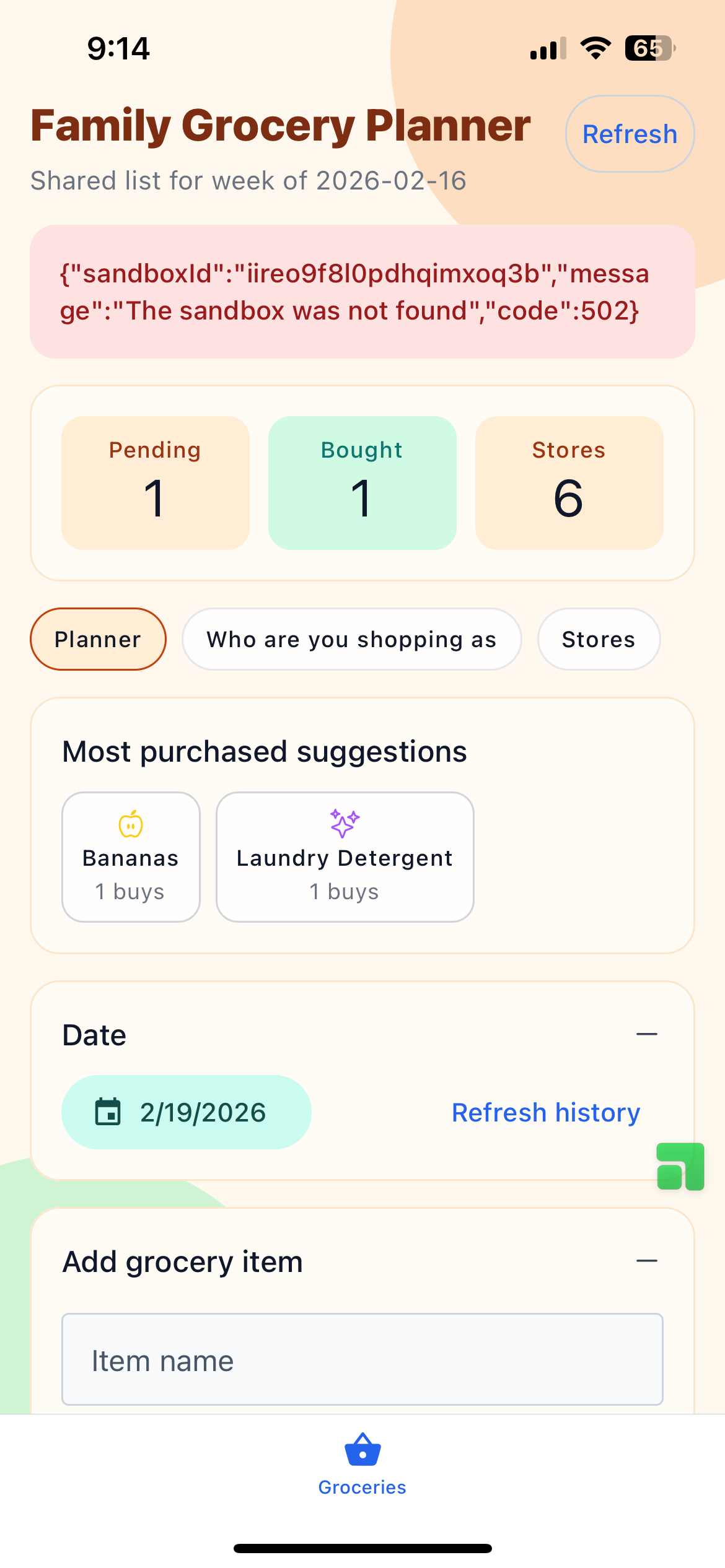
How to resume:
| Platform | What to do |
|---|---|
| Web | Go back to your project in Appifex and click Resume preview |
| Mobile | Open the Appifex app, navigate to your project, and tap on it — the sandbox wakes automatically |
The sandbox restarts in a few seconds. No code or data is lost.
If you're actively testing, interact with the preview at least once every 20 minutes to keep it alive.
Publishing
Publishing deploys your app to your own cloud account. You bring your own credentials, and your app runs on infrastructure you control. This means full transparency — you own the deployment, the domain, and the billing relationship with your cloud provider.
Bring your own cloud
Appifex supports several cloud providers. Each has a generous free tier, so many projects can run at zero cost:
| Provider | Platforms | Free tier |
|---|---|---|
| Vercel | Web, Backend | Generous free plan, no credit card required |
| Railway | Web, Backend | $5 free trial credit |
| Fly.io | Web, Backend | Free allowances for small apps |
| Expo (EAS) | Mobile | Free for OTA updates and builds |
Vercel is the recommended default for web and backend — it has the most generous free plan and requires no credit card.
Connect a provider
Before your first publish, connect your cloud account:
- Go to Settings → Deployment providers in your Appifex dashboard
- Click Enter credentials for your chosen provider
- Paste your API token (each card links to the provider's token page)
- Appifex validates the token immediately
You only need to do this once per provider. Credentials are stored encrypted and used only at deploy time.
Where to get your token:
- Vercel: vercel.com/account/tokens
- Railway: railway.app/account/tokens
- Fly.io: fly.io/user/personal_access_tokens
Publish your app
Click Publish in the session toolbar:
- Select what to publish — Check the platforms you want to deploy (web, backend, mobile)
- Choose a provider — Pick from your connected providers (or connect one inline)
- Deploy — Watch real-time progress as your app goes live
- Get your URLs — Production URLs appear when deployment completes
After your first publish:
- The Publish button shows Published ✓ when your deployed code is up to date
- It changes to Re-publish when you have new code changes ready to ship
- Your provider choice is locked per platform — subsequent publishes go to the same provider
Mobile publishing
Over-the-air updates
After your first app store submission, JavaScript/TypeScript changes can ship instantly via over-the-air (OTA) updates — no new store review needed.
OTA-eligible changes: UI changes, business logic, static assets, JS-only configuration updates.
Requires a new store submission: Native module additions, native code changes, native dependency/SDK updates, permission or entitlement changes.
App Store and Google Play
Submit mobile apps to stores from Project settings → Publishing:
iOS (TestFlight / App Store):
- Connect your Apple Developer account and Expo/EAS credentials (guided setup)
- Enter app name, bundle ID, and version
- Click Submit — your app builds and uploads to App Store Connect
- Distribute via TestFlight or submit for App Store review
Android (Google Play):
- Connect your Google Play account and Expo/EAS credentials (guided setup)
- Enter app name, package name, and version
- Click Submit — your app builds and uploads to Play Console internal testing
- Promote to beta or production when ready
Builds take around 20 minutes. You can leave the page — progress saves automatically.
Custom domains
Since your app deploys to your own cloud account, you add custom domains directly through your provider's dashboard. Appifex doesn't need to be involved — you have full control.
Vercel
- Open your project on vercel.com
- Go to Settings → Domains
- Add your domain and follow the DNS instructions
Vercel provides free automatic SSL. See the Vercel custom domains guide for details.
Railway
- Open your project on railway.app
- Go to your service's Settings → Networking → Custom Domain
- Add your domain and configure DNS
See the Railway custom domains guide for details.
Fly.io
- Run
fly certs add yourdomain.comfrom the Fly CLI, or use the dashboard - Configure your DNS records as instructed
See the Fly.io custom domains guide for details.
General tips
- Most providers issue free SSL certificates automatically
- DNS changes can take a few minutes to a few hours to propagate
- If you use Cloudflare DNS, make sure proxy settings are compatible with your provider
Preview vs production
| Preview | Production | |
|---|---|---|
| Where it runs | Appifex cloud sandbox | Your own cloud account |
| Lifetime | Temporary, pauses after 20 min idle | Permanent, always on |
| Updated | Every code generation | On publish |
| Use | Testing during development | Sharing with users |
| Custom domain | No | Yes, via your provider |