AI code generators skip security. Here's what that costs you.
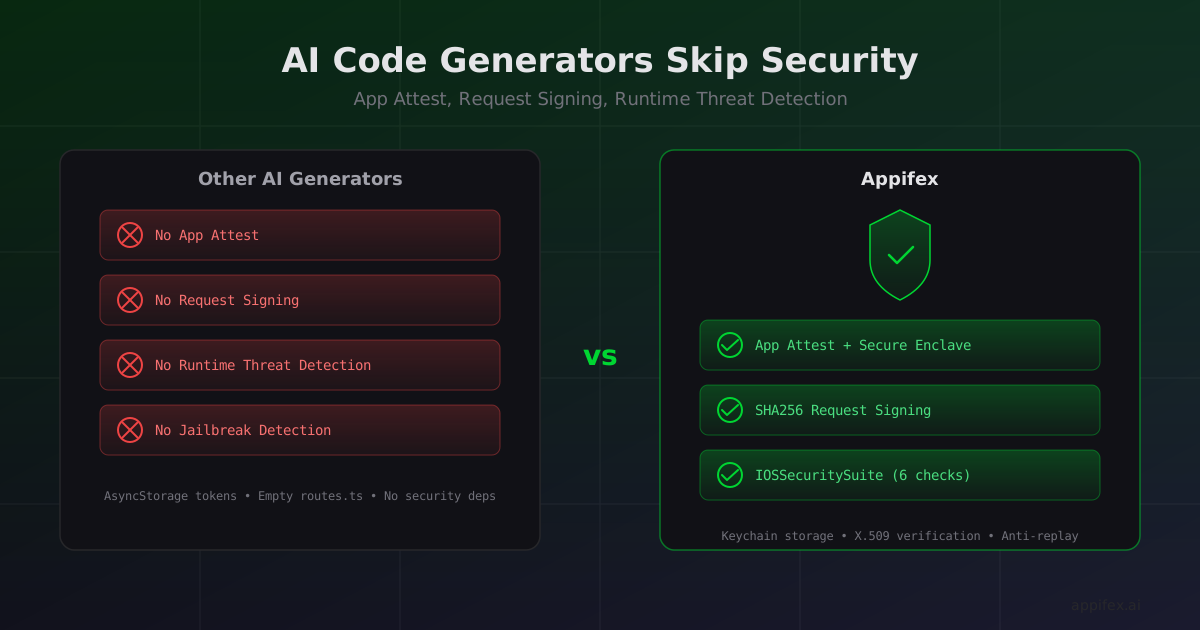
We recently looked at a mobile app generated by one of the most popular AI code platforms on the market. It had zero security infrastructure. No attestation. No request signing. No runtime threat detection. No jailbreak checks. Not a single security-related dependency anywhere in the project.
Most users of AI code generators have no idea what attestation or runtime threat detection even are. They'll never type "add App Attest" into a prompt, because they don't know it exists. The app works, the UI looks good, and they ship it. Experienced developers know these layers matter, but integrating App Attest end-to-end (client key generation, server-side CBOR verification, middleware, anti-replay) is days of specialized work, even for a senior iOS engineer. Either way, it doesn't get done.
For a weekend prototype, that's fine. For anything an enterprise would consider deploying, it's a non-starter.
What AI code generators actually produce
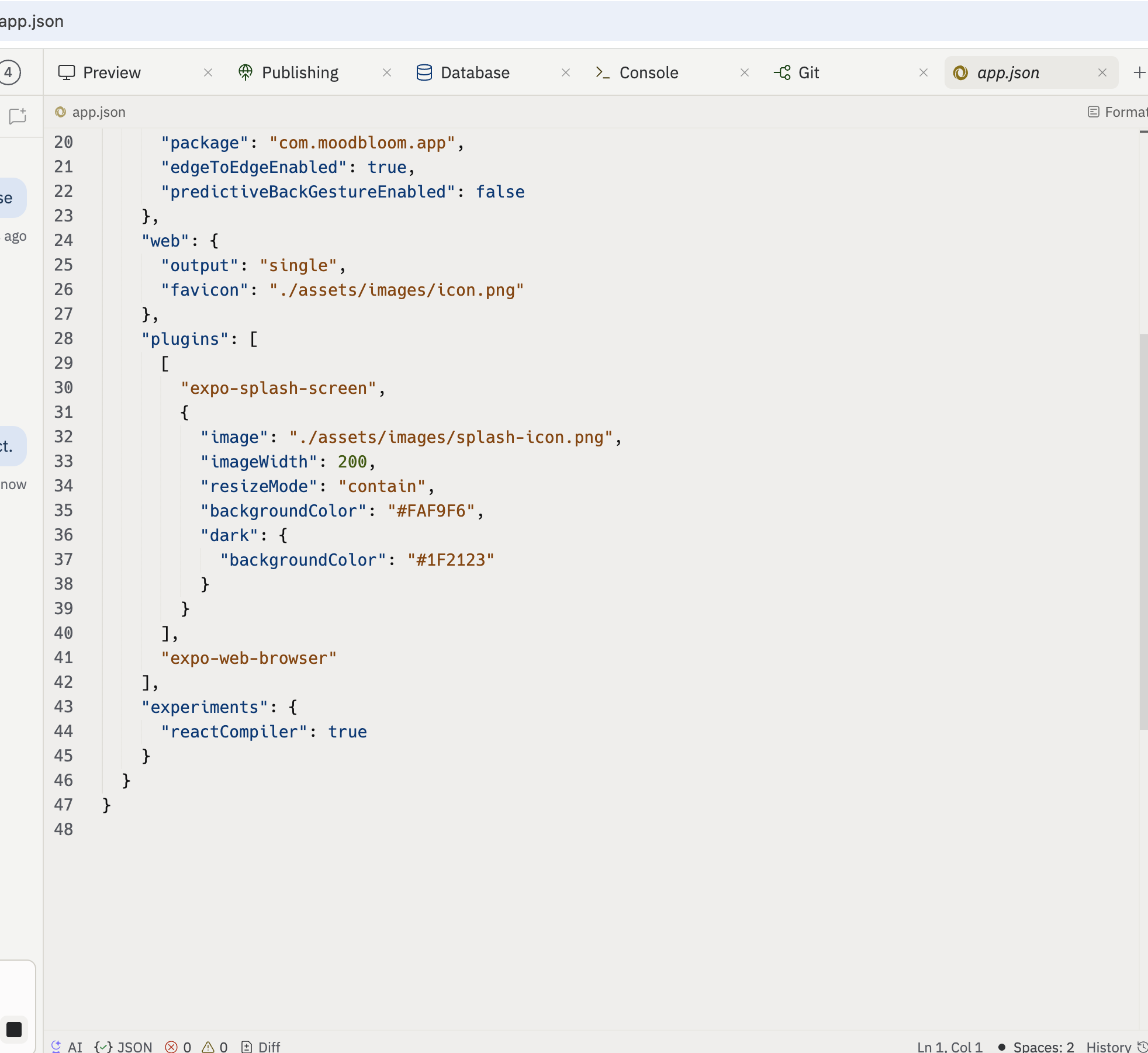
Here's the app.json from a Replit-generated Expo app. Two plugins: expo-splash-screen and expo-web-browser.
And here's the dependency list. Standard React Native libraries — navigation, state management, animations, fonts. Not a single security library.
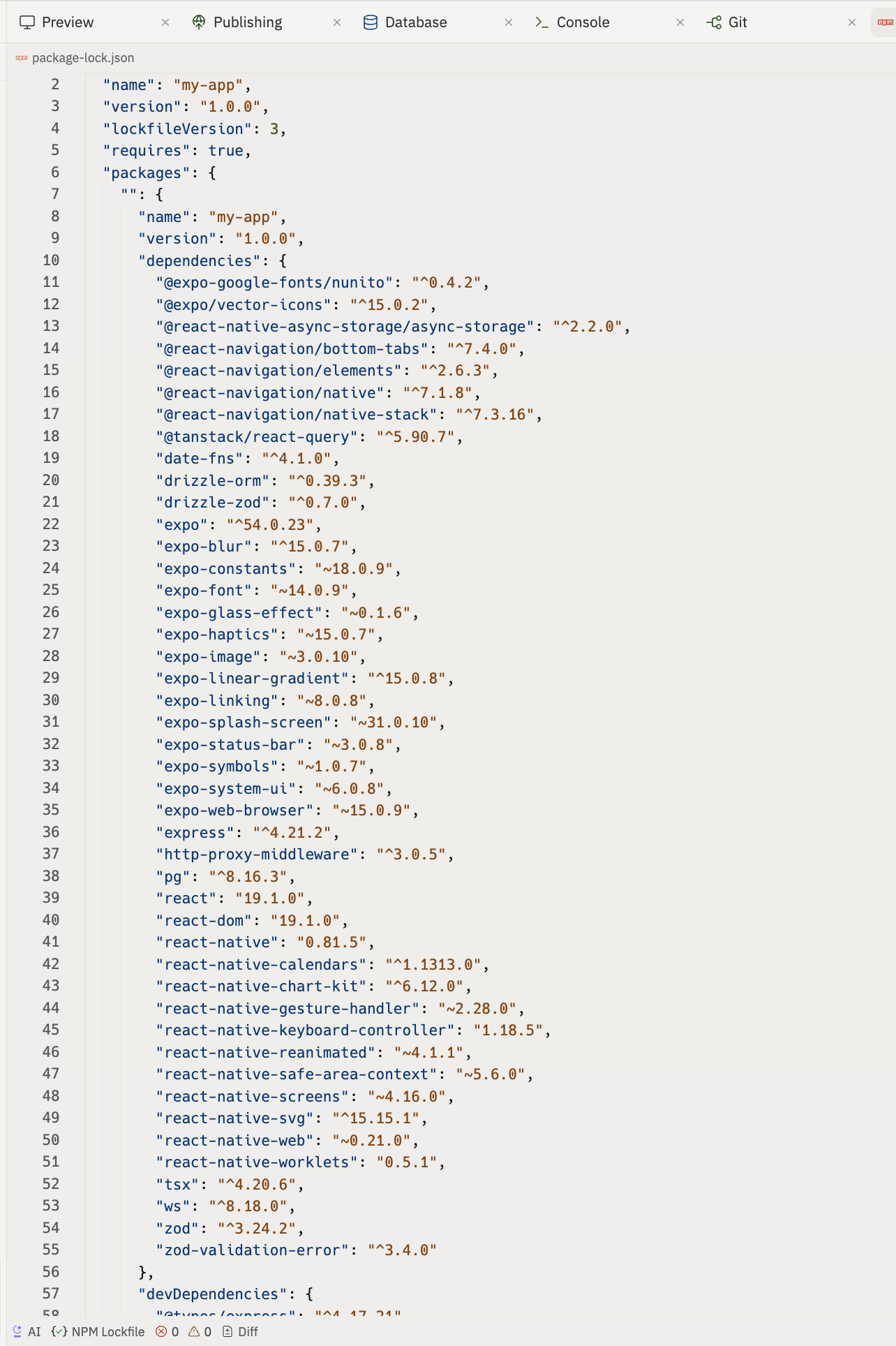
No DCAppAttestService. No IOSSecuritySuite. No certificate pinning. No keychain storage (tokens go into AsyncStorage, which is unencrypted). The server side is equally bare: no rate limiting, no security headers, no request validation middleware. The routes.ts file is literally empty.
This isn't a knock on Replit specifically. It's the industry default. Ask any LLM to build you a mobile app and you'll get the same result: features and UI, with security left as an exercise for the reader.
The problem is structural. LLMs optimize for visible output. A beautifully styled screen gets positive reinforcement in training data. A correctly implemented attestation flow does not. Security is invisible infrastructure, and invisible infrastructure is exactly what generative models skip.
What happens when you ship without it
The consequences aren't theoretical. They show up in industry reports with specific numbers.
According to the 2025 Imperva Bad Bot Report, 37% of all internet traffic is now bad bots, and 44% of advanced bot traffic specifically targets APIs. Without attestation, your mobile app's backend is just another unauthenticated API endpoint. Bots don't need to reverse-engineer your UI; they skip it entirely and hit your endpoints directly.
The financial damage is real. Account takeover fraud cost U.S. consumers $15.6 billion in 2024, up from $12.7 billion the year before. The Verizon 2025 DBIR found that compromised credentials were the initial access vector in 22% of all breaches. Nearly 60% of banks and fintechs lost more than $500,000 to fraud in a 12-month period.
Real-world examples
Pokemon Go was fully reverse-engineered within two weeks of launch because it shipped without certificate pinning or attestation. Bot traffic overwhelmed Niantic's servers so badly it delayed their Latin America launch. Snapchat's unprotected API was reverse-engineered in hours, leading to third-party clients that eventually resulted in a breach exposing 200,000 private photos. Researchers used WhatsApp's unprotected API to enumerate 3.5 billion accounts and download 77 million profile pictures at 7,000 numbers per second.
Compromised devices make it worse
On the device side, Zimperium's 2025 research found that rooted and jailbroken devices experience 3.5x more malware attacks, with filesystem compromise incidents 3,000x more frequent than stock devices. Mobile banking trojan attacks on Android surged 196% in 2024, from 420,000 to 1.24 million incidents. Without runtime detection, your app has no way to know it's running on a compromised device.
And the audit numbers are stark: 95% of mobile apps fail at least one OWASP MASVS category, according to NowSecure's benchmark of 5,500+ apps. 54% fail network security. 47% fail platform security. An AI-generated app with no attestation or runtime checks doesn't just fail one category; it fails several.
How Appifex solves this: App Attest
The numbers above describe what happens when your backend can't distinguish a real app from a script. Appifex addresses this directly. Every Swift native app we generate ships with Apple's App Attest (part of the DeviceCheck framework), which lets your backend cryptographically verify that a request came from a legitimate, unmodified copy of your app running on real Apple hardware. The bot traffic that makes up 37% of the internet? It can't forge a Secure Enclave signature.
The flow works like this:
- The app generates a cryptographic key pair on the device's Secure Enclave
- It requests a one-time challenge from your backend
- The device creates an attestation object: a signed bundle containing the public key, the app's identity, and the challenge
- Your backend verifies the attestation against Apple's root certificate authority
- On every subsequent API request, the device signs the request body with the attested key
Appifex generates this entire flow automatically. On the client side, an AppAttestService manages key generation, challenge fetching, attestation, and request signing as a single state machine. Key IDs persist in the Keychain across app launches. Debug builds skip attestation entirely so the simulator and debugger work normally. Failed attestations retry after 30 seconds rather than permanently locking out the user.
Every API request gets signed automatically. The generated NetworkService intercepts all backend-bound requests and signs them transparently:
/// From an Appifex-generated project (NetworkService.swift)
/// SCAFFOLD FILE — force-copied by Appifex. Do not modify.

private func signIfBackend(_ request: URLRequest) async -> URLRequest {
    guard let url = request.url?.absoluteString,
          url.hasPrefix(BackendConfig.backendURL) else {
        return request
    }
    var req = request
    req.setValue("ios", forHTTPHeaderField: "X-App-Platform")
    await AppAttestService.shared.ensureAttested()
    return await AppAttestService.shared.signRequest(req)
}
No call site needs to know about attestation. Every GET, POST, PUT, and DELETE goes through signIfBackend before hitting the network. The service hashes the request body with SHA256, generates an assertion through DCAppAttestService, and attaches the signature and key ID as HTTP headers.
On the server side, an AppAttestMiddleware verifies every incoming assertion. It validates the X.509 certificate chain against Apple's embedded root CA, checks the RP ID hash against your app's bundle identifier, and enforces a strictly increasing counter to prevent replay attacks.
How Appifex solves this: runtime threat detection
App Attest proves the binary is legitimate. But remember those Zimperium numbers: 3.5x more malware on jailbroken devices, 3,000x more filesystem compromises, 1.24 million banking trojan incidents last year. A valid binary running on a compromised device is still a target. Appifex handles this too.
Every Swift app we generate includes a SecurityService that runs six checks at startup using IOSSecuritySuite: jailbreak detection, debugger attachment, reverse engineering tools (Frida, Cycript), emulator environment, network proxy/MITM, and binary tampering. The service exposes a single isEnvironmentCompromised property for feature gating. If the device is jailbroken, you might disable biometric auth. If a proxy is detected, you might restrict sensitive API calls. If reverse engineering tools are present, you might limit what data the app fetches.
Graceful degradation, not hard crashes
In release builds, if any check trips, the app surfaces a full-screen security alert telling the user exactly what was detected:
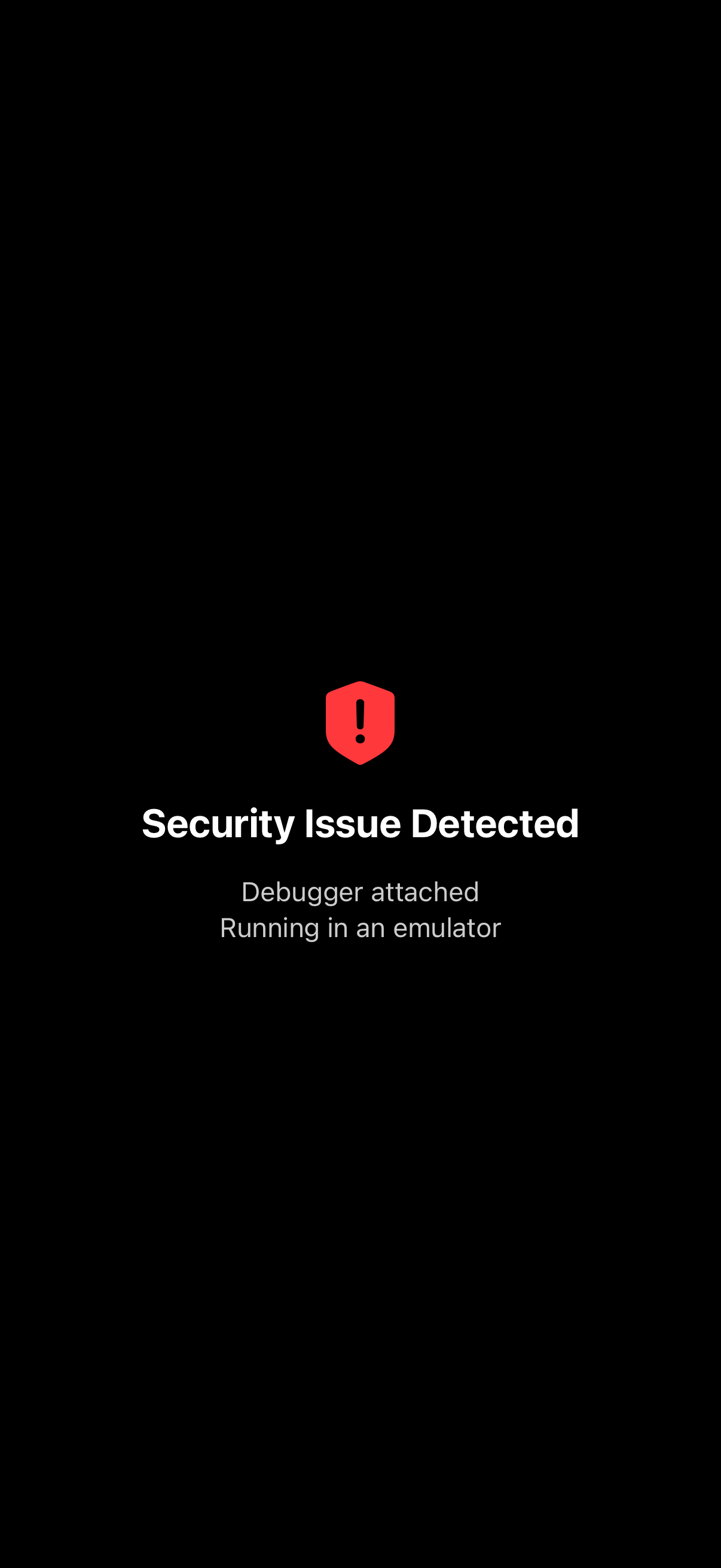
Importantly, the service never crashes the app. No exit(), no fatalError(), no abort(). It degrades gracefully: logs the finding, shows the alert in release builds, and lets the app decide what features to disable. Debug builds always return false so you can develop normally in the simulator with a debugger attached.
Hard kills create terrible user experiences and get apps rejected from the App Store. Feature gating lets you calibrate the response to the threat.
Why Appifex controls what the LLM generates
There's a reason every AI code generator produces the same security gap. LLMs generate what they've seen most often: UI components, navigation, state management. Security infrastructure is rare in training data, so the model leaves it out. You can prompt for it, but you'll get a partial result that takes days to make production-ready. Meanwhile, 95% of apps are already failing OWASP MASVS.
Other AI code generators let the model decide what to include. Appifex flips this. We don't rely on what the LLM wants to generate. We enforce what it should generate, and the security layer is already in place before the LLM writes its first line of your code. Security isn't one prompt away from being accidentally omitted. It ships with every project by default.
What this means for enterprise adoption
Enterprise security teams evaluate mobile apps against frameworks like OWASP MASVS. The checks are specific: Does the app verify its own integrity? Does it detect jailbroken environments? Are API requests authenticated with device attestation? Are credentials stored in the Keychain rather than plaintext storage? NowSecure found that 95% of apps fail at least one of these categories. 54% fail network security alone.
An AI-generated app with no security infrastructure fails every one of these checks. It doesn't matter how clean the TypeScript is or how polished the UI looks. Without attestation, the app can be impersonated, the way Pokemon Go and Snapchat were. Without runtime checks, it can be exploited on the 18.8 million jailbroken iOS devices that Zimperium estimates are active. Without keychain storage, credentials can be extracted from a device backup.
Appifex-generated apps ship with all three layers from day one. App Attest proves device and binary legitimacy. Request signing prevents replay and tampering. Runtime threat detection catches compromised environments before they become attack vectors. These aren't optional add-ons or post-launch hardening steps; they're part of the project scaffold, present in every build.
Check your current generator
If you're using another AI code platform, go check your generated project right now. Search for DCAppAttestService, IOSSecuritySuite, or any attestation middleware. Check your package.json or project.yml for security dependencies. Look for keychain storage instead of AsyncStorage. Chances are, none of it is there.
Now try adding it. Prompt your generator for "App Attest integration with server-side verification." You might get a partial client implementation. You probably won't get the backend middleware, the X.509 chain validation, the anti-replay counters, or the debug/release split done correctly. And you'll spend days wiring it all together, if it works at all.
Most other AI code platforms generate React Native apps exclusively. On the React Native side, Expo's App Integrity module is still in alpha — limited functionality, no server-side verification, and no production guarantees. That's the best option available in the React Native ecosystem today, and it's not ready.
Appifex Swift Native handles it all
Appifex supports native Swift iOS generation, and handles all of this out of the box. App Attest, request signing, runtime threat detection, keychain storage, server-side verification, scaffolded into every project before the AI writes a single line of your code. We built it this way because we care about your app and the effort you put into it. You shouldn't have to choose between shipping fast and shipping secure. Try Appifex and your next app ships with all of this from the first build.
For the full Apple provisioning and code signing walkthrough, read Apple provisioning profiles explained. To set up wireless device testing, see set up your Mac once, build from anywhere. And for the broader architecture that makes all of this possible, read production-grade AI code.